Helpdesk data migration
Any helpdesk to any helpdesk, done right.
Tickets, conversations, contacts, companies, attachments and help centre content, moved between Zendesk, Freshdesk, Intercom, HubSpot, Salesforce and more. Run it self-serve on the DataGrine platform or let our migration experts handle it end to end, with 24/7 premium support.
- Sample run before the full move
- No downtime for your team
- Delta sync at cut-over
- Rollback per run
Where are you moving?
Roughly how many records?
We preserve conversation history, threading and relationships wherever Intercom supports them. Run it self-serve or have our migration team run it, with 24/7 support.
What moves
Your history, with its relationships intact.
Tickets and conversations
Status, priority, type, assignee, tags and custom fields, with every reply and internal note in order.
Contacts and companies
Matched on email or external ID so nobody is duplicated, with company membership kept.
Attachments and inline images
Carried with the message they belong to.
Knowledge base
Categories, sections and articles with their status.
Migration routes
The moves teams ask us about most.
Teams move for Fin and the Messenger, then discover four years of ticket history has to come with them.
Teams moving from Freshdesk often need more flexible routing, workflows and AI-powered support.
Teams moving from Help Scout often need more advanced routing, SLAs and AI-powered support.
Ecommerce teams moving from Gorgias often need support to cover more than order status, with Fin AI Agent on the front line.
Support consolidates onto Freshdesk when the business grows past a single storefront and needs SLAs and reporting across brands.
Cost consolidation or an IT-led standardisation onto the Freshworks stack.
Teams that grew up in a shared inbox move to Intercom when they need routing, SLAs and an AI agent in front of the queue rather than more people behind it.
Teams leave Kustomer for Intercom when Fin AI Agent and the Messenger matter more than a CRM-style customer timeline.
Teams on Zoho Desk move to Intercom for the Messenger, conversational support and Fin AI Agent, usually as the product side of the business outgrows a ticket queue.
Teams move from Freshchat to Intercom to put chat, email and tickets in one Inbox with Fin AI Agent answering first.
Clari + Salesloft is gradually sunsetting Drift, so teams move their chat history to Intercom, where the Messenger and Fin AI Agent take over website conversations.
Teams keep HubSpot as the CRM but move support to Intercom for Fin AI Agent, the Messenger and a dedicated support Inbox.
Support teams move from Salesforce Service Cloud to Intercom for a faster agent experience and Fin AI Agent, often keeping Salesforce as the system of record for accounts.
Teams consolidate from Zendesk onto Freshdesk to bring support onto the wider Freshworks stack, usually at a renewal.
Teams move from Freshdesk to Zendesk when they need a larger ecosystem of apps, more advanced routing or a multi-brand setup.
Teams move from Intercom to Zendesk to standardise on a ticket-first help desk across several brands or business units.
Teams outgrow Help Scout and move to Zendesk for more complex routing, multiple brands and a larger app ecosystem.
Growing teams moving from Help Scout often standardise on Freshdesk for ticketing, SLAs and reporting.
Teams that already run sales and marketing in HubSpot move support out of Zendesk so tickets, contacts and deals sit in one CRM.
Teams standardising on the Zoho suite move support from Zendesk to Zoho Desk so it sits beside Zoho CRM, usually at a Zendesk renewal.
Companies that run sales on Salesforce move support from Zendesk to Service Cloud so cases sit on the same accounts and contacts as the rest of the customer record.
Shopify and ecommerce brands move from Zendesk to Gorgias to work with order data beside every ticket.
Brands that grow past one storefront move from Gorgias to Zendesk for multi-brand support, deeper routing and a larger app ecosystem.
Teams already on HubSpot for marketing and sales move support from Freshdesk so tickets sit on the same contacts, companies and deals.
Teams consolidating on the Zoho suite move from Freshdesk to Zoho Desk so support sits beside Zoho CRM and the rest of their Zoho apps.
Teams leave Kayako for Zendesk when they want a larger app marketplace, multi-brand support and AI agents on the same platform as their tickets.
Teams that work across email, SMS and social in a shared inbox move from Zendesk to Front to collaborate on conversations rather than queue tickets.
Companies standardising on Salesforce move support from Intercom to Service Cloud so cases, accounts and opportunities sit in one system.
Moving from a mailbox, a voice tool, a file export or something not listed? See the supported products, or ask us.
Self-serve
The platform your team can run, with experts behind it.
Map fields and values, check a sample, run the full move and the delta, and roll back any run. Our migration experts are on hand 24/7.
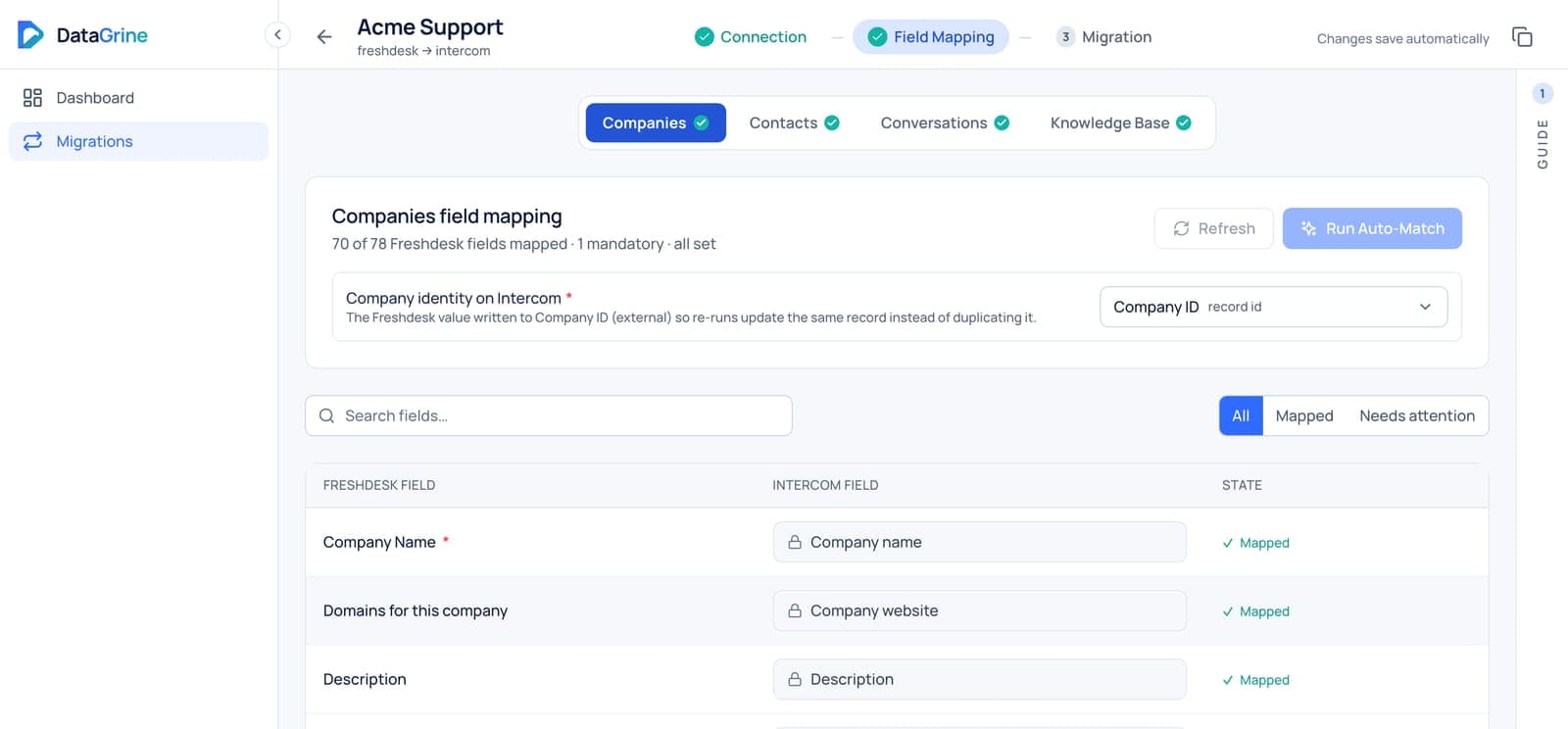
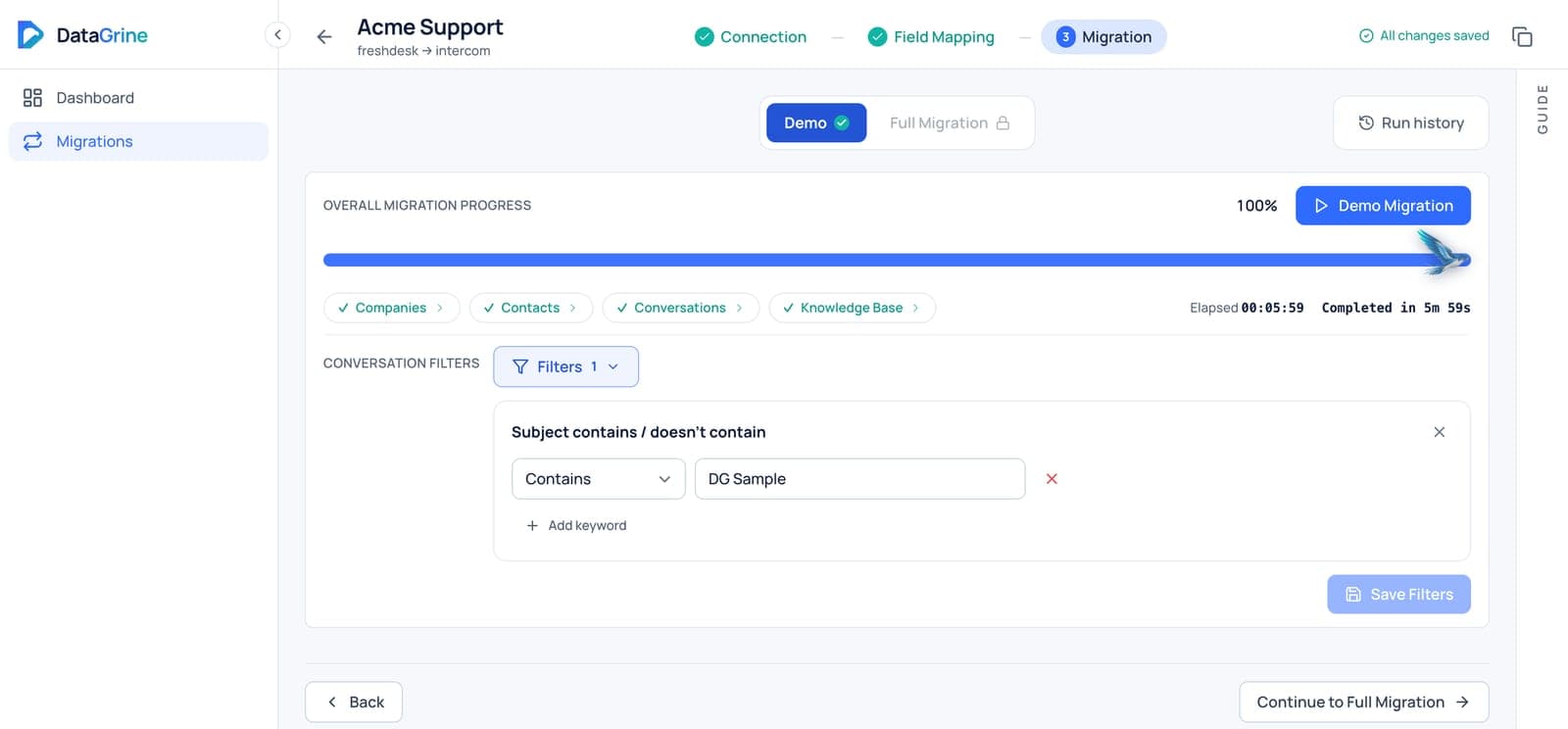
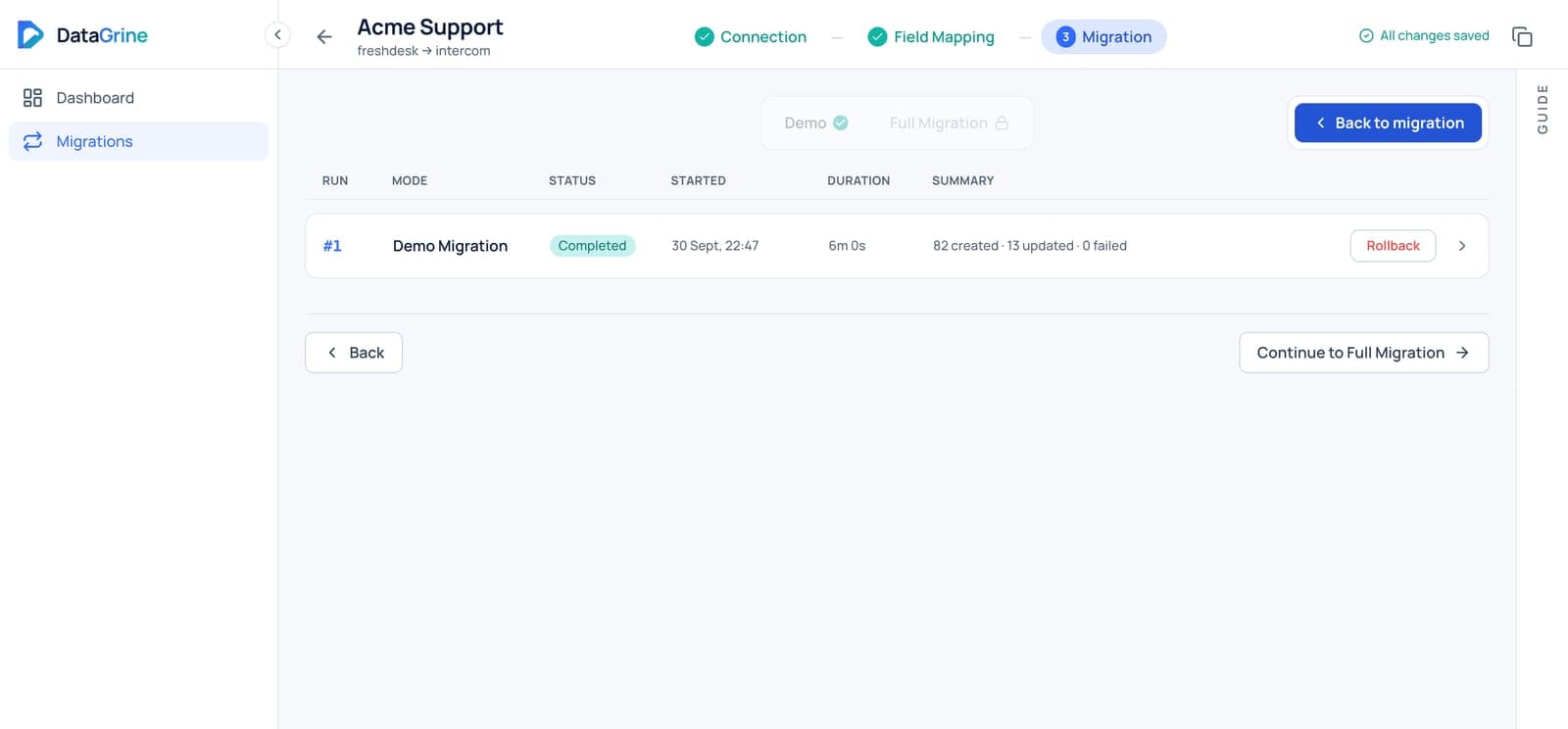
Free sample run
See your own records in the new helpdesk first.
Questions
What teams ask before they move.
Can we run the migration ourselves?
Yes. The DataGrine platform is designed to be self-served by your team: connect, map, run a sample, then the full move and the delta. Or our migration team handles it end to end. Either way you get 24/7 premium support.
Can we test before committing?
Yes. A sample of your own records lands in the new helpdesk first, so you can check threading, fields and attachments before the full run.
Can a migration be rolled back?
Yes. Any run can be rolled back. A rollback reverses only what that run wrote.
Does our team have to stop working?
No. We only read from your old helpdesk, so your team keeps working, and a delta sync at cut-over moves anything created or changed since the full run.
Let’s move your data forward.
Tell us where you are moving from and to. Run it yourself on the DataGrine platform or let our migration team handle it end to end, with 24/7 support either way.
- A written mapping document before anything moves
- A sample migration you review before the live run
- Delta sync at cut-over and rollback per run
- 24/7 premium support until you sign off